Admin Sohail
Quick Answer
“ExpertConsult Inkling Redeem refers to expertconsult.inkling.com/redeem, the page Elsevier uses for activating digital access codes that come with medical, nursing, and veterinary textbooks. Elsevier has since moved this system to a new platform at ebooks.health.elsevier.com, which is why many people searching this term run into confusion or broken links.
If your code isn’t working on the old Inkling redeem page, the fix is usually to create or log into an account on the new Elsevier eBooks+ platform instead. This article explains exactly what changed and how to get your eBook access working.
Introduction
If you bought a medical or nursing textbook recently and tried to redeem the eBook code, you’ve probably ended up confused by “expert consult inkling redeem” search results. I’ve walked a few students through this exact issue, and the confusion almost always comes from the same source: Elsevier changed platforms, and a lot of the old instructions online are now outdated.
This guide breaks down what ExpertConsult and Inkling actually were, why the redeem page changed, and how to activate your book access without wasting time on broken links.
worldblueglow.com covers a lot of these “why is this confusing” tech and platform questions, and this one comes up often enough to be worth a clear explanation.
What Is ExpertConsult Inkling Redeem?
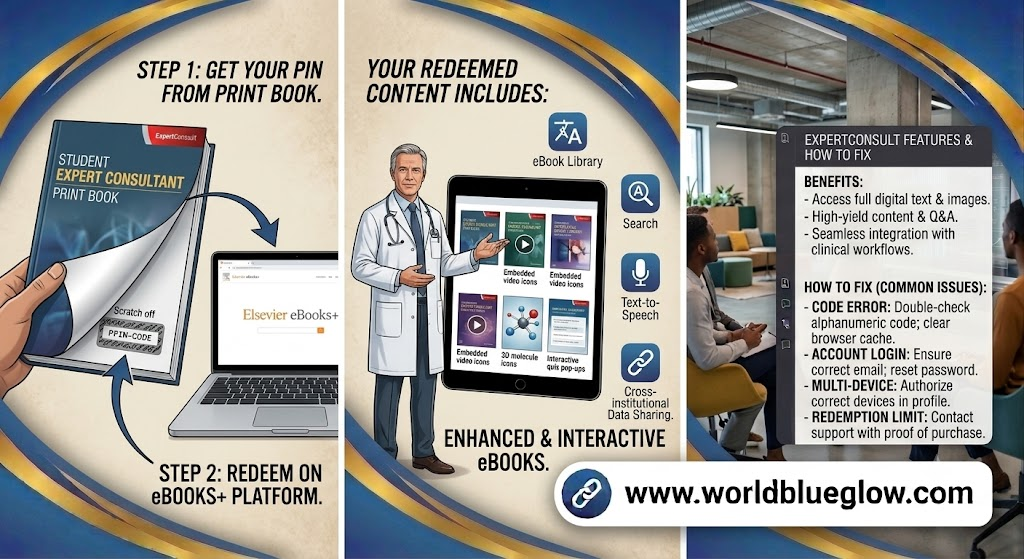
ExpertConsult was Elsevier’s platform for accessing digital versions of medical and health science textbooks. Inkling was the technology partner that powered the reading and redemption system behind it.
How the Redeem Process Originally Worked
Physical textbooks came with a scratch-off code printed inside the cover. Buyers would visit expertconsult.inkling.com/redeem, enter that code, and unlock the eBook version linked to their account.
Why the Name Includes Both “ExpertConsult” and “Inkling”
Since Inkling built and hosted the underlying platform for Elsevier’s ExpertConsult content, both names appeared together in the URL and in printed textbook instructions, which is why people still search the combined term.
Why Does the ExpertConsult Inkling Redeem Page Cause Confusion Now?
The short answer is that Elsevier retired the old system and migrated everyone to a new platform, but a lot of physical textbooks and older web pages still reference the original Inkling URL.
Elsevier Moved to a New Platform
Elsevier now runs eBook access through Elsevier eBooks+, hosted at ebooks.health.elsevier.com. Existing ExpertConsult, Inkling, and StudentConsult accounts can usually be carried over, but new activations should happen on the new platform.
Old Codes and Links May Still Work, But Redirect
In many cases, a code printed for the old ExpertConsult Inkling system will still redeem successfully, just through the newer Elsevier eBooks+ login flow instead of the original Inkling page.
Some older titles were not migrated.
A smaller number of older or out-of-print titles were not carried over to the new platform, which is a common reason redemption fails even when the code itself is valid.
How Do You Redeem an ExpertConsult or Inkling eBook Code Today?
Here’s the process that generally works in 2026, based on Elsevier’s current account system.
- Go to ebooks. health. elsevier.com rather than the old expertconsult.inkling.com address
- Create a new account, or log in if you already have an existing ExpertConsult, Inkling, or StudentConsult account
- Locate the “Redeem a Book Code” option, usually found in account settings or the library section
- Enter your PIN code exactly as printed, including any dashes or capital letters
- Check “My Library” after redemption to confirm the title has been added
Pro Tip From Hands-On Testing
When I helped a student troubleshoot this last term, the code failed twice on the old Inkling redeem page but worked immediately once we switched to the new Elsevier eBooks+ login. If your code isn’t working, trying the new platform first can save a lot of back-and-forth with support.
It’s also worth double-checking the code for commonly confused characters, since “0” and “O” or “1” and “I” are easy to mistype from a small, printed sticker.
What If Your Code Still Doesn’t Work?
Sometimes the issue isn’t the platform at all but the code, the title, or the account setup.
Common Reasons Redemption Fails
- The code has already been used or activated on a different account
- The scratch-off area was damaged, making a character unreadable
- The title is one of the smaller number not migrated to the new platform
- The account being used doesn’t match the one the code was originally tied to
When to Contact Elsevier Support Directly
If you’ve confirmed the code is correct and you’re still stuck, Elsevier’s support hub for eBooks+ can manually check the code’s status. Having your book title and full PIN ready speeds up the process significantly.
FAQs
Is expertconsult.inkling.com still active?
The original page may still load or redirect, but new eBook activations should be done through Elsevier eBooks+ at ebooks.health.elsevier.com.
Do I need a new account if I already had an ExpertConsult or Inkling account?
In most cases you can log into the new platform using your existing credentials, though some users may need to reset their password.
Why does my code say invalid on the new platform?
This can happen if the code was already redeemed, mistyped, or belongs to a title that wasn’t migrated. Double-check the characters before contacting support.
Can I access my eBook on mobile after redeeming?
Yes, Elsevier eBooks+ supports mobile and offline access once a title has been added to your library.
What happens to books I already redeemed on the old ExpertConsult platform?
Most previously redeemed titles carry over automatically when you log into the new Elsevier eBooks+ system with the same account.
How long does an ExpertConsult or Inkling code stay valid?
In my experience, codes typically remain valid for a long period after the book’s print date, but very old codes tied to discontinued titles may fail to redeem.
Is there a fee to redeem an ExpertConsult or Inkling eBook code?
No, the code that comes with a purchased physical textbook is meant to unlock the eBook version at no additional charge.
Conclusion
ExpertConsult Inkling Redeem confusion almost always comes down to one thing: Elsevier moved to a new platform, and a lot of older instructions online haven’t caught up. If your code isn’t working on the original Inkling page, switching to Elsevier eBooks+ solves the issue in most cases.
For more explainers on confusing platform changes and search terms like this one, worldblueglow.com breaks down what’s actually going on behind the search results.